
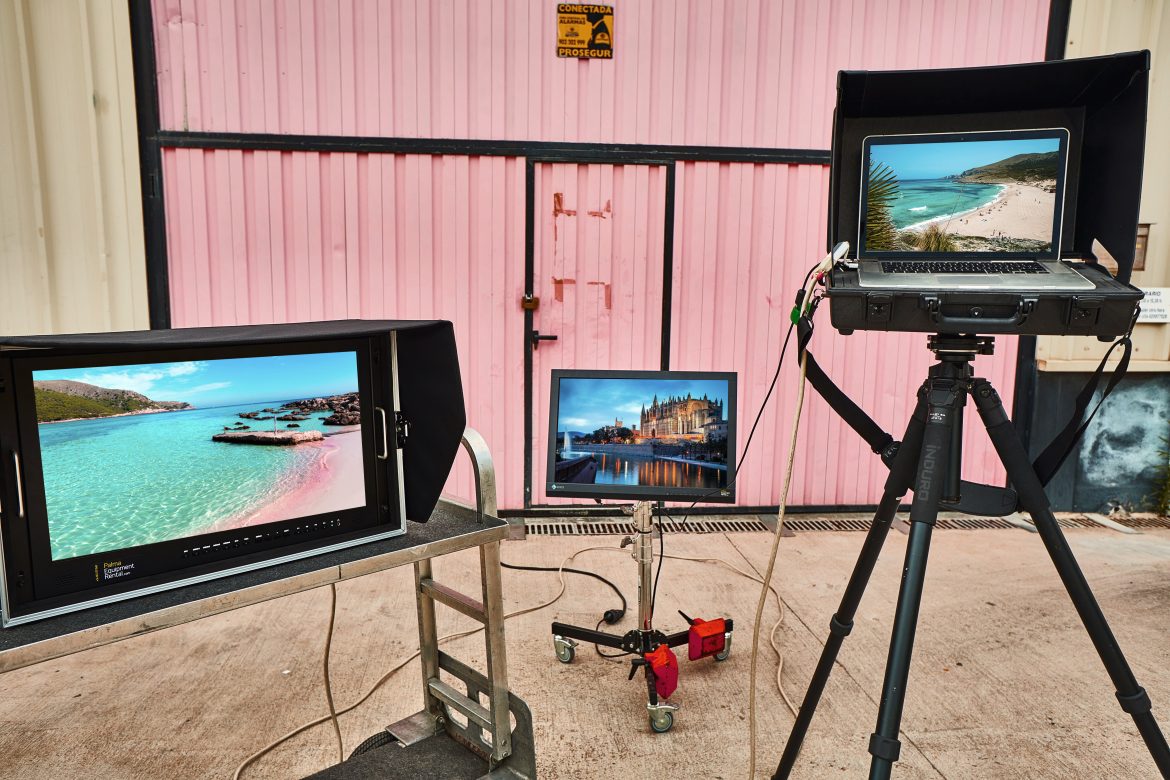
Professional On-Set Monitors & Digital Capture in Mallorca
On a professional photography shoot, taking the photograph is only part of the process.
The photographer, digital technician, art director, client and creative team often need to see what’s being captured as it happens. That makes tethered shooting and professional on-set monitoring an important part of modern commercial photography.
A laptop screen may be enough for a small shoot, but once several people need to evaluate images — or accurate colour and exposure become critical — a dedicated monitor can make a significant difference.
At Palma Equipment Rental, we supply professional digital capture and monitoring equipment for photography productions throughout Mallorca.
Here’s what to consider when building an on-set digital workflow.
Why Shoot Tethered?
Tethered capture allows images to be transferred directly from the camera to a computer as they’re photographed.
For professional photography, this has several advantages.
Instead of judging an image on the relatively small screen on the back of the camera, the photographer and digital technician can inspect focus, exposure, colour and detail on a much larger display.
Images can also be organised, rated and backed up as the shoot progresses.
For fashion, advertising and commercial photography, tethering allows the wider creative team to follow the shoot without continually looking over the photographer’s shoulder.
It changes the way everyone on set can work with the images.
The Laptop Is Only the Beginning
A modern MacBook Pro provides an excellent starting point for a tethered workflow.
For smaller productions, the laptop may be all that’s required.
As the number of people who need to see the images increases, however, relying on a laptop screen becomes less practical.
A separate monitor creates a dedicated viewing area for the photographer, art director, client or agency while leaving the digital technician free to work on the main computer.
This is particularly useful when Capture One is being used for tethered capture.
The digital technician can concentrate on file management, exposure, colour and backups while other members of the production view the selected images on a larger display.
Why Use a Professional EIZO Monitor?
Not all screens display an image in the same way.
Brightness, contrast and colour reproduction can vary considerably between displays, which becomes important when people are making decisions about an image on set.
Professional EIZO monitors are designed for colour-critical work and have long been widely used in photography, retouching and post-production environments.
A calibrated professional monitor provides a much more reliable reference than an unknown television or general-purpose display.
That doesn’t mean every person looking at the monitor will see exactly what eventually appears in print or on every phone screen.
It means the production has a consistent, controlled reference point from which to make decisions.
For advertising and fashion photography, that consistency can be extremely valuable.
Colour Accuracy Starts With Calibration
Buying or renting a good monitor isn’t enough by itself.
The display needs to be calibrated.
Calibration helps ensure that colour, brightness and tonal response are being represented consistently rather than relying on whatever settings happen to be active on the screen.
This becomes especially important when several people are making creative decisions based on what they’re seeing.
Skin tones, product colours, fabrics and subtle differences in exposure can all be difficult to evaluate accurately on an unsuitable display.
A properly configured professional monitor gives the photographer and digital technician a much more dependable starting point.
Building a Tethered Capture Setup
A typical professional digital capture setup may include:
- A high-performance MacBook Pro
- Capture One
- Professional EIZO monitor
- Tether cable and appropriate camera connection
- Fast external SSD storage
- Backup drives
- Monitor and laptop support
- Power distribution
- Extension cables
- Sun protection when working outdoors
The exact setup depends on the production.
A photographer working with a small team in a hotel room has very different requirements from a large advertising shoot with an agency and client watching images as they’re captured.
The important thing is to consider the complete workflow, not just the computer.
Capture One on Set
Capture One has become an important part of professional tethered photography workflows.
It allows images to appear on the computer shortly after capture, where they can be checked, organised and adjusted while the shoot is taking place.
For the photographer and digital technician, this provides immediate access to the files at a useful size.
For the wider creative team, it allows decisions to be made while the subject, lighting and location are still available.
If something needs to change, it can be addressed immediately rather than being discovered later.
Don’t Forget Backup
The digital workflow isn’t only about viewing images.
It is also about protecting them.
Once a photograph has been taken, the production has created something that may be considerably more valuable than the equipment being used to capture it.
A professional workflow should therefore include a clear backup strategy.
Fast external SSDs make it possible to create additional copies of the shoot while work is still taking place.
The exact backup procedure will depend on the production and digital technician, but relying on a single copy of important images is rarely a good plan.
For larger shoots, data management should be considered when the equipment list is being prepared rather than at the end of the day.
Monitoring Outdoors in Mallorca
Mallorca introduces another problem: sunlight.
A beautiful bright location can be terrible for evaluating photographs on a screen.
Even an excellent monitor becomes difficult to judge when direct sunlight is falling across it or the person viewing it is standing in a much brighter environment.
Shade is therefore an important part of an exterior digital setup.
Where possible, the digital workstation should be positioned away from direct sunlight. Monitor hoods, flags or other forms of light control can also help create a more consistent viewing environment.
This is one of those situations where a simple piece of grip equipment can be just as important as the monitor itself.
Heat also needs to be considered.
Computers, monitors, drives and other electronic equipment are happier in a shaded, ventilated working area than sitting for hours in direct Mediterranean sun.
Powering the Digital Station
Digital equipment may not consume as much electricity as large lighting fixtures, but it needs reliable power throughout the shoot.
A laptop, monitor, drives, chargers and other equipment can quickly turn a simple digital station into a collection of power supplies and cables.
On locations without convenient mains electricity, portable battery systems can provide clean, silent power for the digital workstation.
This can be particularly useful when the lighting itself is battery powered and there would otherwise be no reason to bring a generator.
Power distribution should also be planned properly so that the digital technician isn’t forced to improvise once the shoot is underway.
Keep the Digital Station Mobile
Location photography rarely stays in one place for long.
A production might start outside a finca, move inside for another setup and then relocate completely during the afternoon.
The digital station needs to be able to move with it.
Equipment carts and mobile workstations can make a major difference here.
Instead of repeatedly disconnecting computers, drives, monitors and accessories, a properly organised digital station can be moved much more efficiently between setups.
This also helps protect the equipment and keeps cables, drives and accessories organised throughout the day.
Digital Capture Equipment Rental in Mallorca
Palma Equipment Rental supplies professional digital capture and monitoring equipment for photography productions in Mallorca, including MacBook Pro computers, calibrated EIZO monitors, Capture One, fast external SSD storage and supporting equipment for professional tethered workflows.
Our rental facility is based in Palma de Mallorca, with equipment available for productions throughout the island and the other Balearic Islands. Mainland Spain can also be arranged on request.
Whether the production needs a simple laptop-based tethering setup or a larger digital workstation for photographer, agency and client viewing, the principle is the same:
The image shouldn’t only look good through the camera. Everyone making decisions on set needs to be able to see it properly too.
Related Articles


0 Comments
Leave a reply
You must be logged in to post a comment.